> ## Documentation Index
> Fetch the complete documentation index at: https://vendo-mintlify-54d109e7.mintlify.site/llms.txt
> Use this file to discover all available pages before exploring further.
# Automations
> One model: an automation is a record someone owns, your deployment runs it, and Cloud is only the alarm clock.
An automation is a **record**. It has an owner, a trigger, a task, and — if the
task is a goal — the name of the agent that thinks it through. It lives in your
database, it runs in your backend, and something outside just has to wake you up
on time.
```text theme={null}
record wake run
────── ──── ───
owner → a cron in your app → steps → run in-process
trigger the dev ticker goal → the named agent,
task Cloud's heartbeat with the OWNER's grants
agent name an inbound webhook
armed
```
**Upgrading is a clean break.** Automations stored by an earlier version are
dropped — there is no migration. Users re-create theirs by asking in chat, and
anything you declared in code comes back on your next deploy.
## Two authors, one model
Someone has to say an automation should exist. There are exactly two who can,
and they differ only in what consent means.
They ask for it in words. Consent is the **grants** they allow while they
are present — and they can revoke any of them later, which stops the run
loudly rather than silently widening it.
`agent.on(...)` in your source. Consent is **the code**: it exists because
you deployed it, and your next deploy reconciles it.
### A user asks for it
```text theme={null}
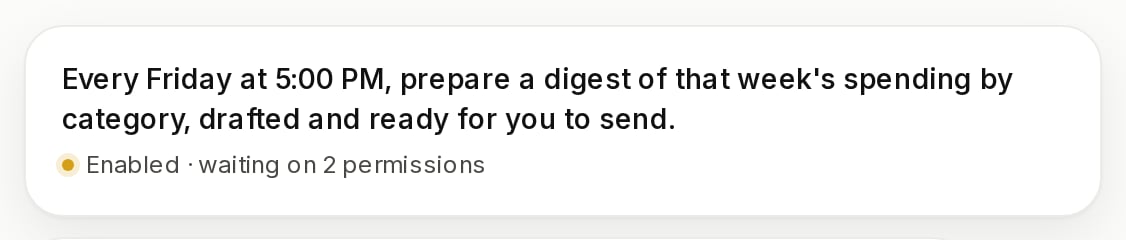
"Every weekday at 8am, email me the invoices that went overdue overnight."
```
The agent creates the record and tells them what it armed, in the thread. There
is no form, no separate automations screen, and no create call for you to make —
Vendo deliberately ships no public create. Everything that can author one already
does.
 ### You declare it in code
```ts lib/agent.ts theme={null}
import { agent } from "@vendoai/agents";
export const support = agent({ name: "support" });
support.on("0 9 * * 1", "summarize the week and email ops");
support.on({ every: "1d" }, "refresh credit scores");
support.on({ event: "payment.failed" }, "triage and notify the user");
```
`.on()` is a declaration. It returns nothing, touches no database, and is
collected at module load; the reconcile happens once at boot. A bad schedule
throws right there, before your process serves anything — `"every monday"` is
not a cron, and you find that out at the declaration site rather than at 2am.
See [`.on()`](/backend/automate) for the full surface.
## What wakes it
Your deployment decides what is due. Nothing else does.
A five-field cron, a plain interval, or a one-shot timestamp.
`"0 8 * * 1-5"` · `{ every: "15m" }` · `{ at: "2026-09-01T09:00Z" }`
Your own product event, emitted from the code path that owns it.
`{ event: "invoice.paid" }`
A signed delivery from a connected service.
`{ webhook: "stripe" }`
Host events fire in your own process, on the line that emitted them:
```ts theme={null}
await vendo.emit("invoice.paid", invoice, principal);
```
That runs every armed automation listening for `invoice.paid` — the emitting
user's, and those of every org they belong to — and answers with the run ids it
started.
Schedules need someone to knock. One door does it, and it is idempotent:
```http theme={null}
POST /api/vendo/tick
```
A duplicate knock claims nothing and fires nothing. Three things can knock: a
cron in your own infrastructure, your dev server's own ticker, or Vendo Cloud.
With a Cloud key there is nothing to set: the deployment derives the secret from
`VENDO_API_KEY` and publishes it, with its own URL, when it boots. Without one,
set `VENDO_TICK_SECRET` yourself. The door takes a bearer token **or** a
standard-webhooks signature, and both are checked against that one secret — with
neither a key nor a secret, every knock is refused.
Cloud's heartbeat is an **alarm clock, not a brain**. It calls `/api/vendo/tick`
on every enrolled deployment once a minute with a signed, empty body. It holds
no schedule, decides nothing about what is due, and never writes a run. The
run ledger you read in the console is the one your deployment wrote.
## Agents are code, never stored
A record names an agent with a string. The agent itself is your code, registered
under that name when your process boots and looked up when the automation fires.
```ts lib/vendo.ts focus={4} theme={null}
import { createVendo } from "@vendoai/vendo/server";
import { billing, support } from "./agents";
export const vendo = createVendo({ agents: [support, billing] });
```
Two agents claiming one name throw at startup, where you are watching. A record
naming an agent nobody registered writes a **failed run**, naming the name it
could not find — never a silent skip, and never someone else's agent running
under this record's grants.
A goal runs with the **owner's** grants, inside your backend. A steps task needs
no brain at all and runs in-process.
## Permissions before the first fire
Nobody is there to approve anything at 2am, so the asking happens when the
automation is turned on.
```ts theme={null}
const { enabled, missing, grantSetId } = await vendo.automations.enable(id, ctx);
```
`missing` is what the owner still has to allow; they belong to one grant set, so
one decision settles them all. After that the automation runs as the person who
armed it, every time — until they revoke something, and then the next run fails
loudly with the permission it needed named on it, and one tap runs it again.
## Observe and control
In the browser there is nothing to build: the wire resolves the context from the
request, and one hook carries every verb into a panel you write yourself.
```tsx theme={null}
const { automations, enable, disable, runs, dryRun, stopRun, rerun } = useAutomations();
```
Server-side there is no request to read from, so every verb takes the caller's
`RunContext` last — that is what scopes the read to what this principal may see,
so there is no ambient "current user":
```ts theme={null}
import type { RunContext } from "@vendoai/core";
const ctx: RunContext = {
principal: { kind: "user", subject: "user_ada" },
venue: "automation",
presence: "present",
sessionId: "sess_ops",
};
await vendo.automations.list({ owner, agent }, ctx); // deployment-wide
await vendo.automations.get(id, ctx);
await vendo.automations.enable(id, ctx);
await vendo.automations.disable(id, ctx); // the kill switch
await vendo.automations.dryRun(id, ctx, event); // what it would do; runs nothing
await vendo.automations.runs.list({ automationId, owner, agent, status }, ctx);
await vendo.automations.runs.get(runId, ctx);
await vendo.automations.runs.stop(runId, ctx);
await vendo.automations.runs.rerun(runId, ctx);
```
There is no `app` filter, because a record holds no app reference. An app page
filters by resolving its own `automations` list and dropping the dead ids.
`disable` is a person's decision, and it outranks your code: a redeploy's
reconcile will never re-arm something a human switched off.
## Where to go next
`agent.on(...)` — every shape, and what a redeploy does.
.on() →
Your own routes, extracted into a guarded tool set.
API tools →
Risk grade, approval, and an audit line on every call.
How Vendo works →
### You declare it in code
```ts lib/agent.ts theme={null}
import { agent } from "@vendoai/agents";
export const support = agent({ name: "support" });
support.on("0 9 * * 1", "summarize the week and email ops");
support.on({ every: "1d" }, "refresh credit scores");
support.on({ event: "payment.failed" }, "triage and notify the user");
```
`.on()` is a declaration. It returns nothing, touches no database, and is
collected at module load; the reconcile happens once at boot. A bad schedule
throws right there, before your process serves anything — `"every monday"` is
not a cron, and you find that out at the declaration site rather than at 2am.
See [`.on()`](/backend/automate) for the full surface.
## What wakes it
Your deployment decides what is due. Nothing else does.
A five-field cron, a plain interval, or a one-shot timestamp.
`"0 8 * * 1-5"` · `{ every: "15m" }` · `{ at: "2026-09-01T09:00Z" }`
Your own product event, emitted from the code path that owns it.
`{ event: "invoice.paid" }`
A signed delivery from a connected service.
`{ webhook: "stripe" }`
Host events fire in your own process, on the line that emitted them:
```ts theme={null}
await vendo.emit("invoice.paid", invoice, principal);
```
That runs every armed automation listening for `invoice.paid` — the emitting
user's, and those of every org they belong to — and answers with the run ids it
started.
Schedules need someone to knock. One door does it, and it is idempotent:
```http theme={null}
POST /api/vendo/tick
```
A duplicate knock claims nothing and fires nothing. Three things can knock: a
cron in your own infrastructure, your dev server's own ticker, or Vendo Cloud.
With a Cloud key there is nothing to set: the deployment derives the secret from
`VENDO_API_KEY` and publishes it, with its own URL, when it boots. Without one,
set `VENDO_TICK_SECRET` yourself. The door takes a bearer token **or** a
standard-webhooks signature, and both are checked against that one secret — with
neither a key nor a secret, every knock is refused.
Cloud's heartbeat is an **alarm clock, not a brain**. It calls `/api/vendo/tick`
on every enrolled deployment once a minute with a signed, empty body. It holds
no schedule, decides nothing about what is due, and never writes a run. The
run ledger you read in the console is the one your deployment wrote.
## Agents are code, never stored
A record names an agent with a string. The agent itself is your code, registered
under that name when your process boots and looked up when the automation fires.
```ts lib/vendo.ts focus={4} theme={null}
import { createVendo } from "@vendoai/vendo/server";
import { billing, support } from "./agents";
export const vendo = createVendo({ agents: [support, billing] });
```
Two agents claiming one name throw at startup, where you are watching. A record
naming an agent nobody registered writes a **failed run**, naming the name it
could not find — never a silent skip, and never someone else's agent running
under this record's grants.
A goal runs with the **owner's** grants, inside your backend. A steps task needs
no brain at all and runs in-process.
## Permissions before the first fire
Nobody is there to approve anything at 2am, so the asking happens when the
automation is turned on.
```ts theme={null}
const { enabled, missing, grantSetId } = await vendo.automations.enable(id, ctx);
```
`missing` is what the owner still has to allow; they belong to one grant set, so
one decision settles them all. After that the automation runs as the person who
armed it, every time — until they revoke something, and then the next run fails
loudly with the permission it needed named on it, and one tap runs it again.
## Observe and control
In the browser there is nothing to build: the wire resolves the context from the
request, and one hook carries every verb into a panel you write yourself.
```tsx theme={null}
const { automations, enable, disable, runs, dryRun, stopRun, rerun } = useAutomations();
```
Server-side there is no request to read from, so every verb takes the caller's
`RunContext` last — that is what scopes the read to what this principal may see,
so there is no ambient "current user":
```ts theme={null}
import type { RunContext } from "@vendoai/core";
const ctx: RunContext = {
principal: { kind: "user", subject: "user_ada" },
venue: "automation",
presence: "present",
sessionId: "sess_ops",
};
await vendo.automations.list({ owner, agent }, ctx); // deployment-wide
await vendo.automations.get(id, ctx);
await vendo.automations.enable(id, ctx);
await vendo.automations.disable(id, ctx); // the kill switch
await vendo.automations.dryRun(id, ctx, event); // what it would do; runs nothing
await vendo.automations.runs.list({ automationId, owner, agent, status }, ctx);
await vendo.automations.runs.get(runId, ctx);
await vendo.automations.runs.stop(runId, ctx);
await vendo.automations.runs.rerun(runId, ctx);
```
There is no `app` filter, because a record holds no app reference. An app page
filters by resolving its own `automations` list and dropping the dead ids.
`disable` is a person's decision, and it outranks your code: a redeploy's
reconcile will never re-arm something a human switched off.
## Where to go next
`agent.on(...)` — every shape, and what a redeploy does.
.on() →
Your own routes, extracted into a guarded tool set.
API tools →
Risk grade, approval, and an audit line on every call.
How Vendo works →